

Web browsing involves almost every digital task. You use a browser to read news, check email, research topics, work on projects, shop online, and manage different accounts. The tools within your browser are important with all of the time spent online. Wave Browser Reviews Provide Users a Better Understanding of a Productivity-Centric, Cleaner Browsing, and Sustainable Browser. Wave Browser is an all-in-one browsing experience with AI assistance, ad blocking, memory-saving technology, smart tab organization, and custom features. It partners with 4ocean, linking browsing to ocean clean up initiatives.
Why Do People Look for Another Browser
A browser often begins simple. You go to a website and start working. Things change over time. You add extensions, open more tabs, and use extra tools for different jobs.
Soon, your browser could have work websites, research pages, email accounts, social media, online documents, shopping pages, video websites, and AI tools. It takes time to manage all these pages. The more tabs, the harder it is to find information. Too many extensions add another layer of browser management. Wave Browser does it another way. The browser packs up a lot of useful functions, meaning you have fewer separate tools to deal with during regular browsing.
A Smarter Way to Browse
The clean browser interface keeps you focused on the page in front of you. Often, online advertising adds more content to websites. Pages are also hard to use because of pop-ups and other unwanted elements. Ad blocking is built into Wave Browser. This gives users a way to cut down on unwanted advertising without another extension for basic ad-blocking needs. For example, reading a long article for research purposes. You want to find useful information fast. That makes the job easier with less distraction on the page. The same is true for everyday browsing. If you check some websites every morning, a cleaner browsing experience can help minimize small interruptions during each session. Small changes can make a difference in busy days.
How AI Fits into the Browsing Experience
AI has become a helpful part of online work. People use AI tools to work with information, to research subjects, and to handle content-related tasks. Wave Browser baked AI assistance into its browsing experience. This provides users with AI support without making AI a separate activity in itself.
Suppose we had a simple research task. You open a webpage and you need to know what information is on that page. It’s another step from the web page to a separate AI service. And with AI help in the browser, your workflow is closer to the information you’re already looking at. This is handy for people who work with online info on a regular basis. The feature might be useful to writers, students, researchers, marketers, remote employees, and online business owners when working on research and content tasks.
The value depends on your daily habits. Those who work with AI have more reason to use this feature than those who don’t often do it.
Memory Management When You’ve Got Lots of Tabs
Computer memory is used by browser tabs. Videos, images, interactive tools, and web applications on pages often require more system resources. Having many such tabs open for hours can impact browser and computer performance. Wave Browser has memory-saving technology to help manage browser resources. This feature is designed for people who need to work with multiple pages to open at once. A marketer might have a keyword research page, analytics program, client website, content document, email and a few reference pages open. It doesn’t make much sense to close these pages every few minutes. You may need them again soon.
Thanks to memory-saving technology, this type of user has a more practical way to handle a busy browser session.
Better Organization with Smart Tabs
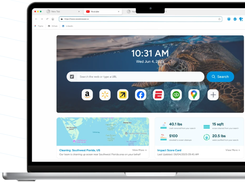
Easy to open tabs. it is harder to find the right one later. A window with twenty tabs is a different problem than a window with five tabs. If you have many pages open, you spend more time searching for the information you need. Wave Browser provides intelligent tab organization to help you manage larger browsing sessions. Rather than thinking of each tab as a separate page, you can organize your browsing around the work you do.
For example, you might want to group research pages together but keep work pages separate. You might also keep shopping tabs separate from project tabs.
This kind of organization makes managing the browser easier. You spend less time scanning through tabs, and more time working on the task itself.
Green Browsing and Wave Browser
Another difference for Wave Browser is on the sustainability side. The browser has a partnership with 4ocean, connecting everyday browsing activity with ocean cleanup efforts.
This makes Wave Browser relevant for those users that care about the environmental side of technology.
The eco-friendly web browser approach adds an environmental factor for users to consider, in addition to the usual browser features. You still use the browser for normal internet activity. The difference is in the sustainability initiative that is attached to the product. The 4ocean partnership gives users an environmental angle alongside the browser’s technology features.
For those who care about sustainability when selecting digital products, this part of Wave Browser is worth noting.
What is Custom Browsing?
People use browsers differently. A single user might have ten tabs open. Another might keep fifty. A person could spend most of the day researching. Someone else might use the browser mostly for email and shopping. Personalized browsing experience allows users to customize the browser to their own habits. Wave Browser provides users with a browsing environment with several built-in tools. This approach minimizes the necessity of building the experience from many separate extensions.
Users who do not want to invest too much time in the search for additional browser tools will also appreciate a simpler setup.
Is Wave Browser Safe for Work?
Wave Browser has several features aimed at daily productivity. The primary advantage is when various functions collaborate. Ad blocking helps reduce distractions. AI assistance for information tasks. Memory management technology is about managing resources. Smart tabs help with organization. Each feature solves a different browsing problem. The result is a browser designed around the way people work online today. You don’t have to think of productivity as one big thing. Small changes in tab management, page clutter and browser resources can also make your day go more smoothly.
For instance, a content writer could have multiple sources open while also keeping a document open. A marketer might review search results, websites, analytics tools, and campaign pages. While each user has a different task, they all benefit from improved browser organization.
How Students Might Use Wave Browser
Students often use many online sources simultaneously. An assignment may include search results, articles, videos, online notes, documents, and educational websites. This results in a need for better tab management. This type of work is best suited to Wave Browser’s smart tab organization. You also get memory-saving technology for when you have multiple research pages open.
Another avenue for working with online information is AI assistance. “Browser-based assistance might be useful for students who are already using AI to do research.
A simple research session opens sources and arranges the pages that are related. The student is able to work with important references open. AI assistance is there when you need it without having to constantly switch between different tools. This makes the research process easier to handle.
How Professionals Might Use It
Professionals often are on more than one website on the same workday. A digital marketer might use search tools, analytics platforms, websites, documents, email, and social platforms. A better organized browser helps to separate these activities. Wave Browser provides professionals with a number of tools in a single browsing environment. Smart tabs organize pages. Memory saving technology allows for larger sessions. Ad blocking cuts down on page distractions. AI assistance is useful for information-related work.
These features do not eliminate the need for good organization. They give you tools to have a cleaner workflow.
What to Know Before Switching Browsers
A new browser should fit your normal routine. Before switching, think about what you need from your current browser.
Consider:
- how many tabs you typically have open
- how often you use AI tools
- if online ads distract you
- how much browser memory your workflow requires
- if tab organization is important to you
You should also check the compatibility and privacy preferences of your website. Think about the websites and online tools you use every day before making a change.
A feature-rich browser is useful when those features help you with problems you actually have.
Why Wave Browser Stands Out in 2026
Wave Browser combines a lot of modern browsing needs in a single product. At the heart of the browser are productivity, organization, cleaner browsing, AI support, memory management, and sustainability. That combination gives users several reasons to look at the browser. The strongest fit is likely for people who spend a large part of their day online and want more control over their browsing environment.
The sustainability partnership also gives Wave Browser another point of interest for users who care about environmental efforts.
Closing Words
Wave Browser takes a practical approach to the modern web. The browser combines several useful tools rather than concentrating on one feature.
Blocking ads can be cut down on unwanted page content. AI helps with knowledge-based tasks. Memory-saving technology helps with longer browsing sessions. Smart tab arrangement gives you more control of your open pages. The 4ocean partnership brings a sustainability angle.
For users who want a cleaner and more organized browser experience, Wave Browser offers several features worth exploring in 2026. Your own browsing habits should guide the final choice.
FAQs
- An Introduction to Wave Browser Reviews
Wave Browser Reviews point out features like AI Assistant, a built-in ad blocker, memory-saving tech, smart tab organization, custom browsing options, and sustainability efforts through a partnership with 4ocean.
- Is the Wave Browser more energy efficient?
Wave Browser has partnered with 4ocean to achieve sustainability focus. The partnership connects everyday browsing activity with ocean cleanup efforts.
- Does Wave Browser support a lot of tabs?
Yes. Wave Browser comes with smart tab management and memory-saving technology. These features support users who regularly work with larger numbers of browser tabs.
- Does the Wave Browser have AI capabilities?
Yes. AI assistance is part of the Wave Browser experience. The feature is aimed at people working with online information and research tasks.
- Who is the Wave Browser for?
Wave Browser is one to consider if you want built-in ad blocking, AI assistance, memory-saving tech, smart tab organization, custom browsing features, and a sustainability-focused approach. These features might be helpful for users who keep a lot of tabs open or use the internet for work, research, and daily online tasks.